
Welcome to Pathwork! Let's Get Your Team Up and Running.
A dedicated onboarding program built around your underwriting workflows, your teams, and your leadership's goals.

Your Dedicated Success Lead
Jolie Bartlett — Customer Success Lead
Role: Your dedicated partner for live onboarding, co-pilot sessions, workflow optimization, and ongoing strategy.
Book Time With Your CS LeadGetting Oriented
Where to Start in Pathwork
Ask Pathwork: Your Instant Answer Line
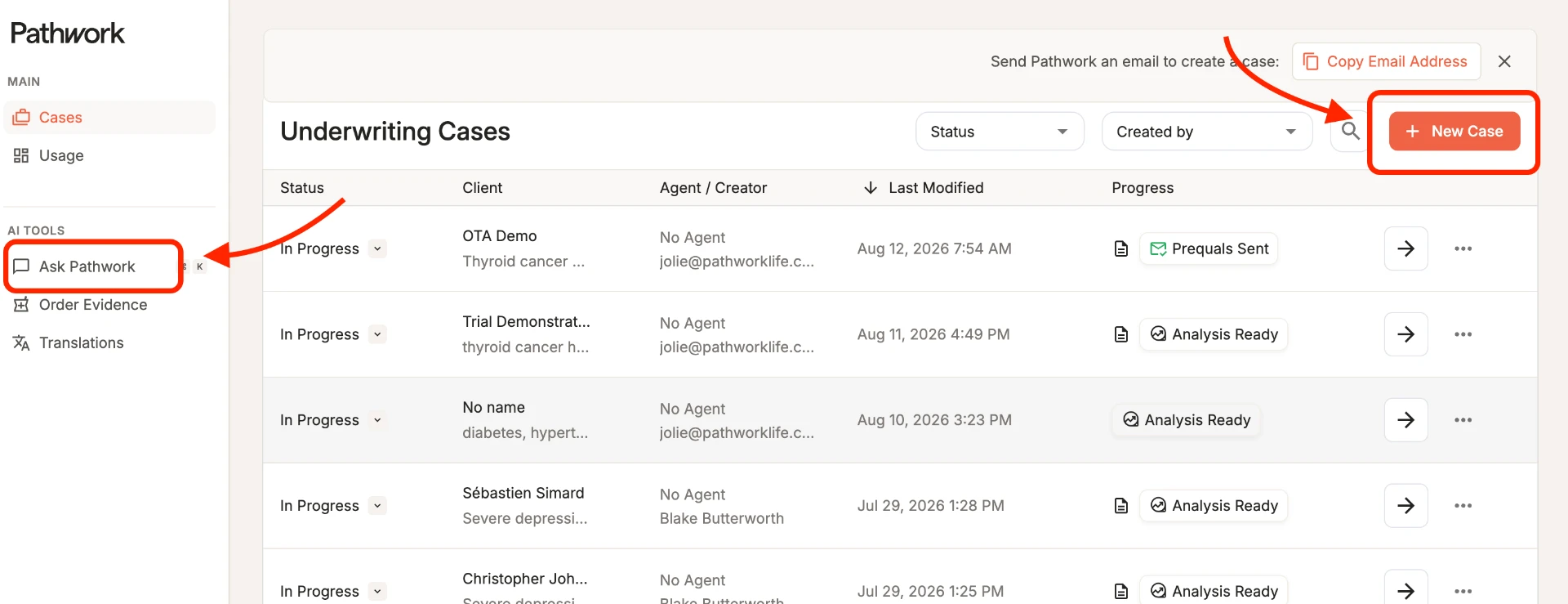
- Where it lives
- Click Ask Pathwork in the main left-hand navigation menu.
- What it's for
- Built for speed. Instant, chat-based lookups for everyday transactional questions — carrier guidelines, product rules, simple single impairments, and follow-up questionnaires.
- Key outcome
- Instant answers on demand, eliminating manual searches across external carrier PDFs and guidelines.
Tip: Ask away — Ask Pathwork queries are completely unlimited and never count against your case or page allotments.
Start a Case: Your Workspace for Deeper Case Work
- Where it lives
- Click the Start Case button in the top-right corner of your screen.
- What it's for
- Built for depth. Your workspace for deep case evaluations — from evaluating informal client notes and multi-carrier quick quotes to analyzing complex medical files, ordering Rx insights, and submitting trial packets.
- Key outcome
- Get a complete, structured risk assessment and carrier breakdown in minutes — cutting manual APS review times by up to 90% and standardizing multi-carrier quotes and trial submissions.
Co-Pilot Sessions
Get Your First Win — With Your Co-Pilot
Rather than figuring this out solo, your team's first wins happen live, side-by-side with your CS Lead during 1:1 Co-Pilot Sessions on your own real cases.
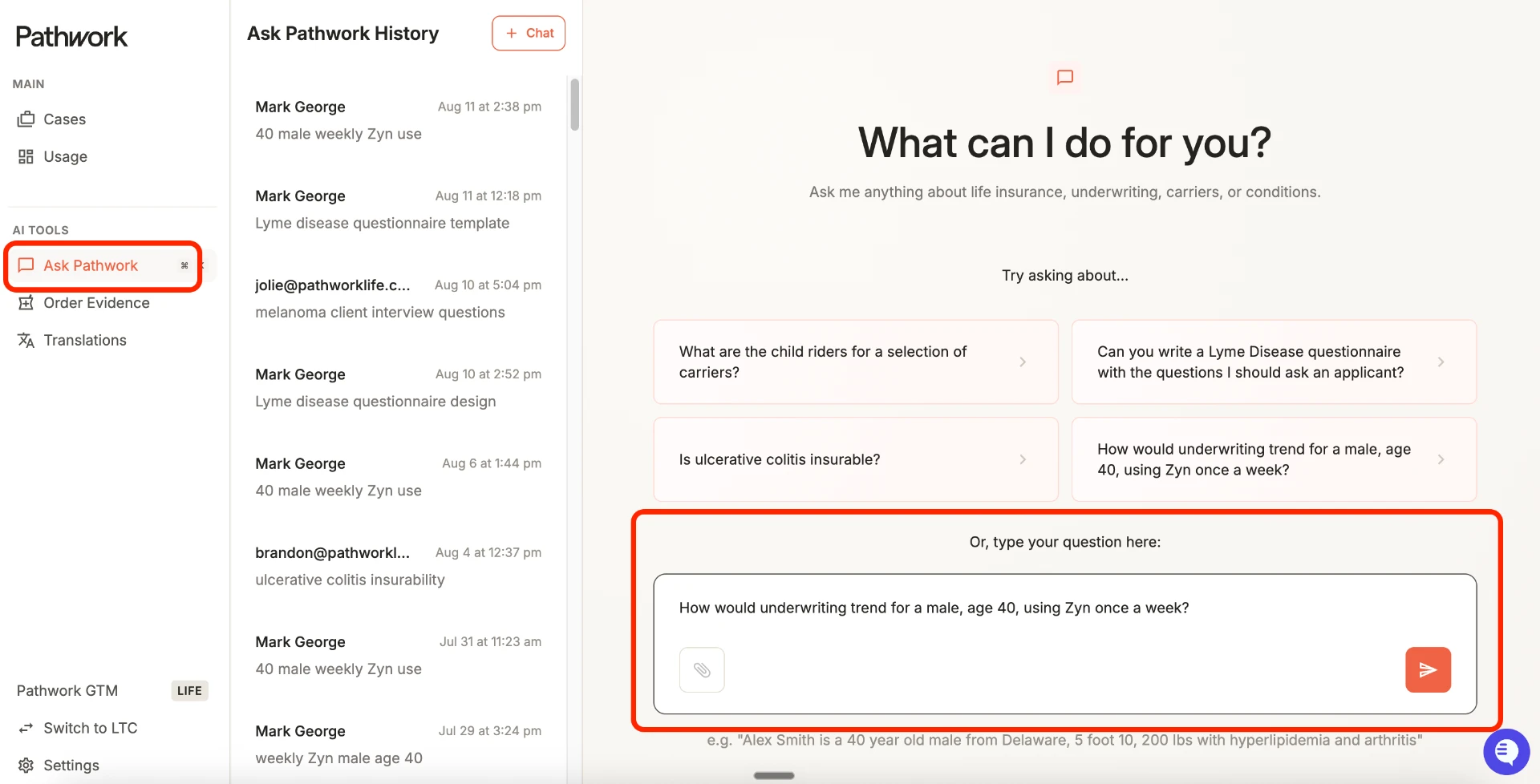
Get Instant Answers (Ask Pathwork)
When to use: When you need immediate carrier guidelines or transactional answers without opening external PDFs or manuals.
Examples:
- "Which carriers offer child riders on IUL products?"
- "Compare build chart limits across Lincoln Financial and Prudential."
- "What follow-up questions should I ask for a client with Sleep Apnea or Lyme Disease?"
- "How would underwriting trend for a male, age 40, using Zyn once a week?"
Steps:
- Click Ask Pathwork in the left-hand navigation menu.
- Type your specific carrier, impairment, or product question into the chat.
- Review answers returned in seconds.
"I Got a Guy" Scenarios & Quick Quotes (Start a Case)
When to use: To quickly assess directional risk class or shop an early-stage scenario across carriers before formal application.
Examples:
- A messy email overview with build details, Type 2 Diabetes, and sleep apnea; an intake questionnaire asking to shop 3 core carriers for directional pricing.
Steps:
- Click Start Case in the top-right corner of your screen.
- Enter whatever initial client/policy details or free-form notes you have.
- Review the Risk Class Estimate to see key underwriting considerations and get a 30,000-foot view of risk placement.
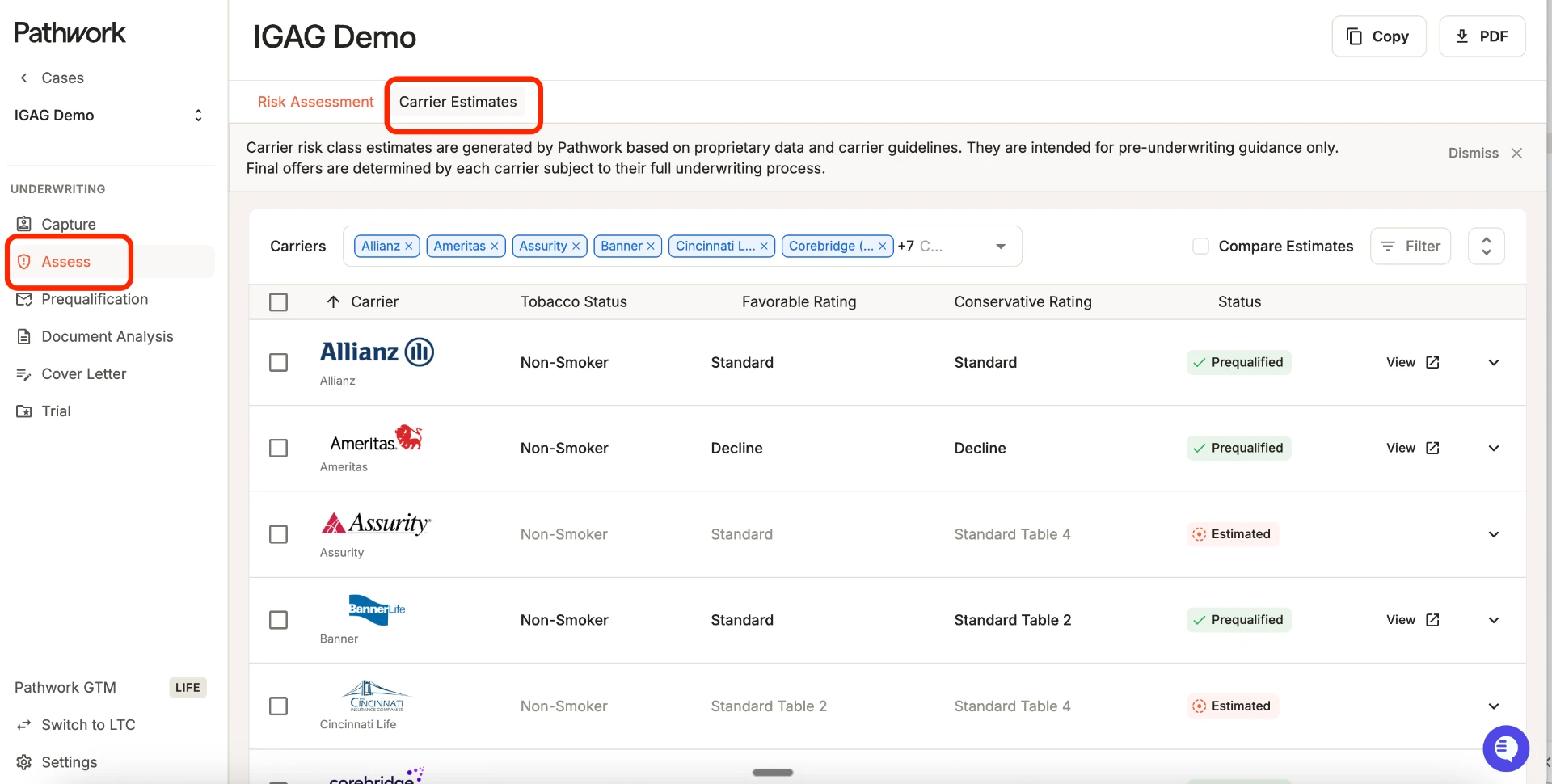
- Review Carrier Estimates & Insights to see carrier-by-carrier rating breakdowns, specific underwriting rationale, and appetite notes.
- Click Prequalification in the left-hand navigation menu of the case.
- Select your target carriers — Pathwork populates a de-identified, compliant email draft using case details that you can review and modify before sending directly from your email.
- Monitor incoming carrier replies on the Prequalification page or directly within your regular email inbox.
Analyzing Medical Records (Start a Case)
When to use: When you receive raw medical records (APS, EHRs, EKGs). Pathwork cuts 150–200 page APS reviews from 90 minutes down to 6–10 minutes by surfacing key risk factors and timeline evidence.
Examples:
- A 150-page APS file needing risk factor extraction and medical timeline summaries; a file with past cardiac history where you need to check A1C trends or tobacco references via Chat with Files.
Steps:
- Click Start Case in the top-right corner of your screen.
- Click the Upload Medical Records tab — we recommend uploading all available medical records at the same time for complete, unified analysis.
- You will receive an email notification as soon as your medical records are processed and ready for review.
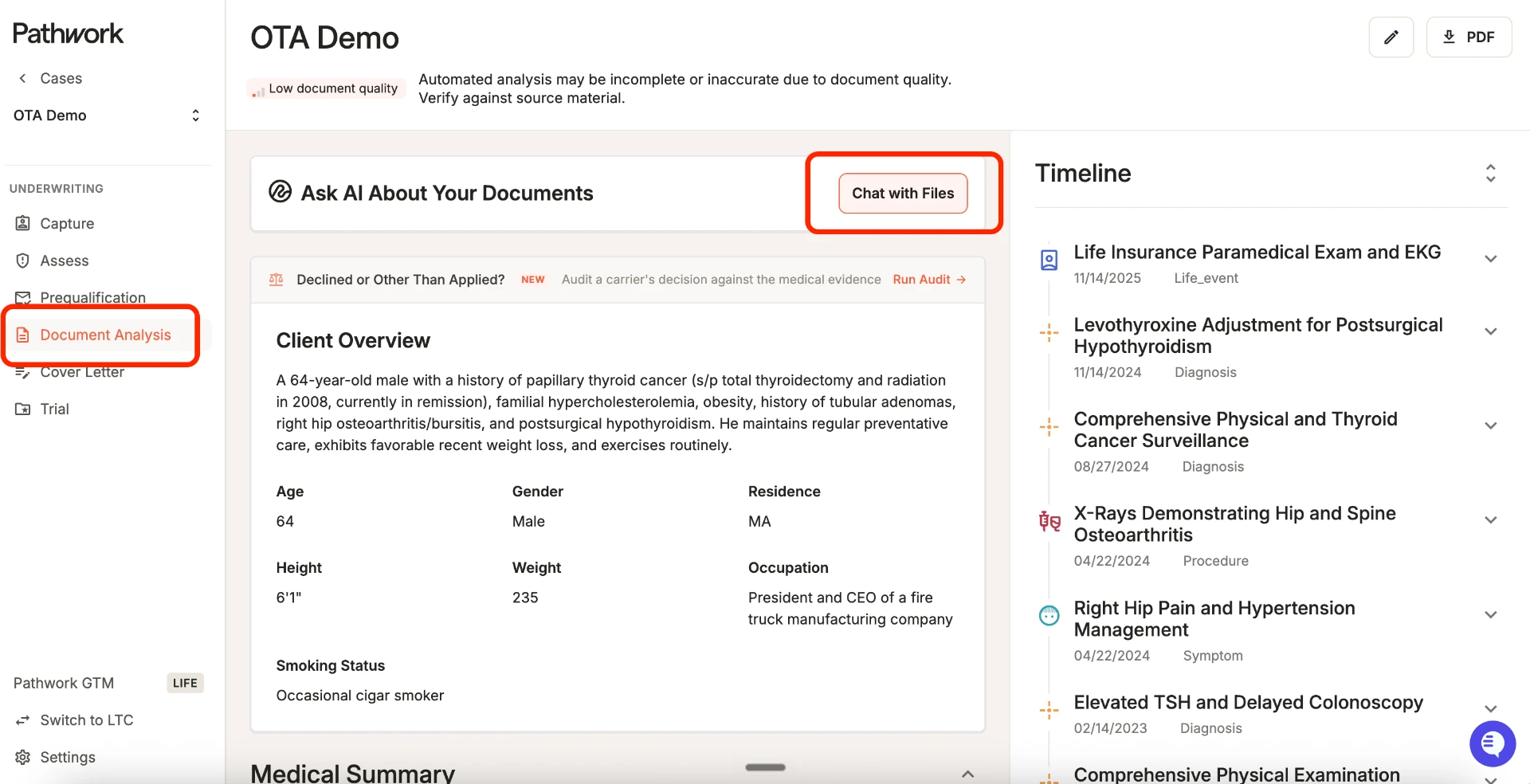
- Once processed, click Document Analysis in the left-hand navigation of the case to review structured risk flags, medical timelines, and source-linked evidence.
- Use Chat with Files inside the case to ask specific questions across the medical records (e.g., "What was the most recent A1C reading?" or "Pull all references to tobacco use").
Submit Informals (Trial Management)
When to use: To build a complete trial packet and submit it to dozens of approved carriers with automated file-splitting.
Examples:
- A completed medical case ready to package into a trial submission across 5 approved carriers.
Steps:
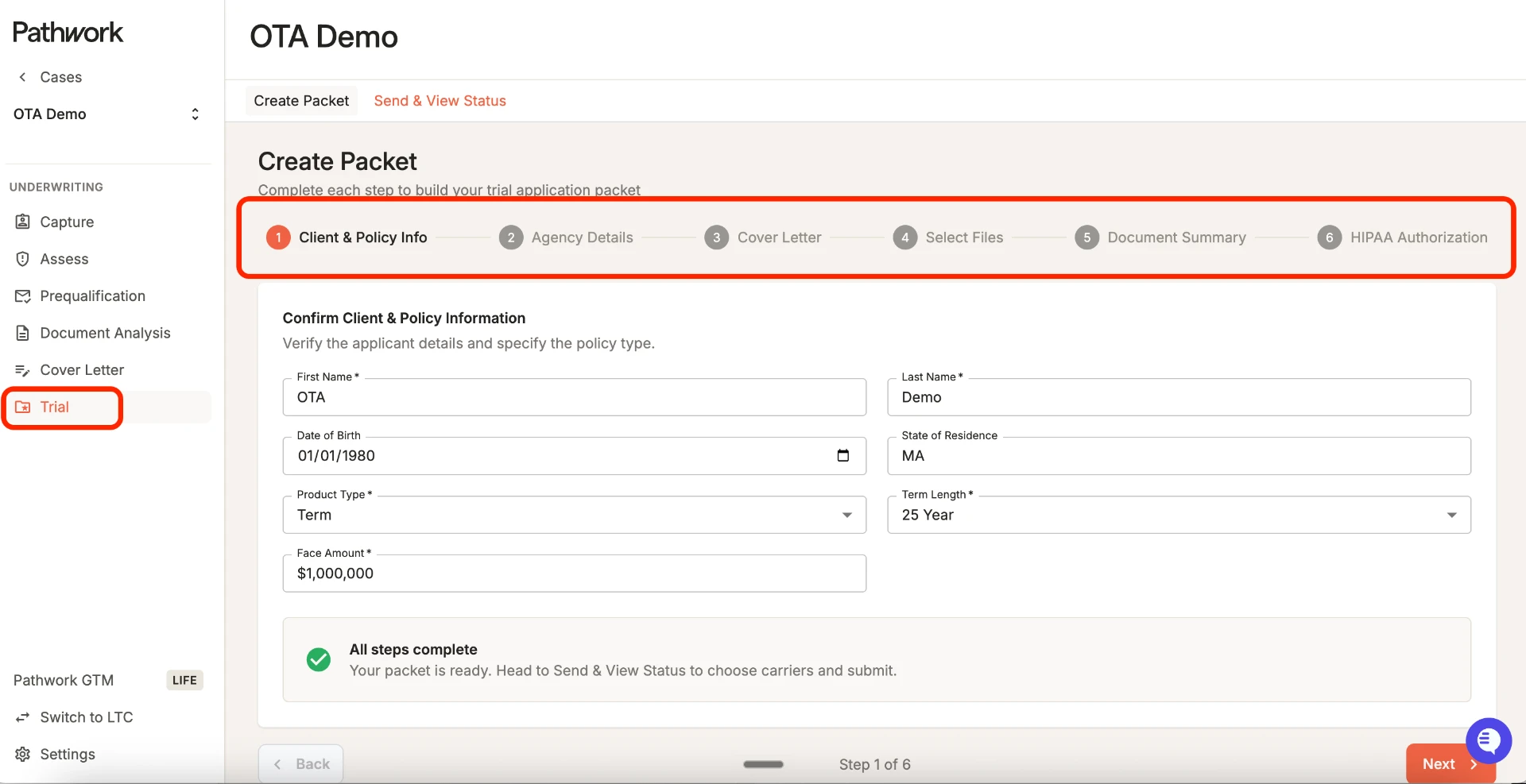
- Open your active case file and click Trial in the left-hand navigation menu.
- Complete the 6-step builder: enter client/policy details, review/edit the autogenerated cover letter, confirm medical files, and upload the required HIPAA authorization. (Note: You can also access and generate standalone Cover Letters anytime under Case Features in the left-hand menu.)
- Click Select Carriers to Send, check your target approved carriers, and click Send to Carriers.
- Track delivery in the Send & View Status table. Pathwork automatically splits heavy APS files into sequential emails so nothing bounces, and carrier replies return to your regular email inbox.
First Win Target: Identify the 1 or 2 workflows above that match what you do every day. Try running a small handful of cases before our next check-in so we can review your experience and answer any questions.
Onboarding Track
Onboarding Roadmap
Your onboarding runs through three phases, moving at the pace of your team size and workflow complexity — from first live cases through measurable business value.
- 1
Pre-Launch (Before Kickoff)
Set the foundation before day one — confirm the team roster, provision access, and align on what success looks like.
Key action: Your CS Lead builds the Mutual Action Plan (MAP) with your Executive Sponsor, confirms primary use cases and priority teams, and schedules the kickoff call plus the first round of live 1:1 Co-Pilot sessions.
Outcome: Aligned Start: Goals, owners, and timelines agreed before the first login.
Stakeholders: CS Lead, Executive Sponsor & Account Executive
- 2
Phase 1: First Wins (Days 1–7)
Log in, complete your kickoff call, and run a small handful of live cases or quick quotes that match what you do every day.
Key action: Answer immediate questions on your initial cases and run the first live 1:1 Co-Pilot sessions, where underwriters and case managers work through real cases side-by-side with your CS Lead.
Outcome: Immediate Comfort: First live cases processed with immediate time-savings visible.
Stakeholders: CS Lead, Executive Sponsor, Underwriters & Case Managers
- 3
Phase 2: Workflow Habit (Days 8–30)
Integrate Pathwork into daily routines for core tasks, expanding into additional platform features whenever your team is ready.
Key action: Offer targeted 1:1 workflow follow-ups, answer edge-case questions, and monitor account usage trends. For your team, this includes follow-up training on additional workflows as your team is ready, recurring drop-in office hours for complex cases, and early usage summaries to your Executive Sponsor.
Outcome: Core Adoption: Platform becomes your default assistant for everyday case tasks.
Stakeholders: Underwriting Staff, Case Managers & Executive Sponsor
- 4
Phase 3: Value Review (Ongoing)
Continue expanding usage across additional use cases and members as needed.
Key action: Conduct periodic check-ins with leadership to review usage analytics and measure time-saving impact. For your team, this includes a Business Value Analysis (BVA) presented to leadership covering total cases processed, medical pages summarized, and hours reclaimed across the firm, and a transition into ongoing quarterly business reviews.
Outcome: Capacity Savings: Firms reclaim an average of ~55 hours per month (actual savings varies by case volume).
Stakeholders: CS Lead, Account Executive & Executive Sponsor
As usage matures, your CS Lead will also work with you on account expansion — scaling seat access from your initial power users to additional case management, underwriting, and support teams across your organization.
Problem → Solution
Common Case Challenges and How Pathwork Solves Them
“I have a messy email with multiple impairments and no structure.”
Start a Case to get an instant Risk Class Estimate across preferred carriers, surfacing key underwriting considerations and appetite in seconds.
“Reviewing a 150+ page APS takes hours of manual hunting.”
Upload medical files and go to Document Analysis to extract structured risk factors, build an instant medical timeline, and cut review time down to 6–10 minutes.
“I need to find a specific lab reading or note buried in a massive APS.”
Use Chat with Files inside the case to ask direct questions (e.g., "What was the most recent A1C?") and get immediate, cited answers.
“Carrier guidelines are buried across dozens of PDF manuals.”
Ask Pathwork quick questions for instant carrier comparisons, product rules, or follow-up questionnaires.
“Sending informals requires manual cover letters and email file-splitting.”
Use Trial Management to automatically generate cover letters, select target carriers, and automatically split heavy APS files so emails never bounce.
“We need defensible, sourced evidence behind underwriting decisions, not just a summary.”
Your team gets access to Milliman-powered Evidence Retrieval, introduced during secondary workflow training, for an added layer of sourced medical evidence.
Quick Value Boosters
Did You Know?
Pathwork Has a Built-In Audit Workflow for OTA & Decline Rebuttals
When a carrier returns a case rated or declined, run an audit from the Document Analysis page. Simply input the carrier's reasoning to compare claimed risks against actual medical evidence, uncover unsupported claims, and generate copy-ready talking points to push back and salvage lost business.
You Can Search Exact Medical Terms in Chat with Files
Instead of manually searching through 150+ pages, type targeted prompts like "Pull all mentions of A1C trends over the past 3 years" or "List every specialist consulted" to jump straight to source evidence in seconds.
Ask Pathwork Is Your Unlimited Scratchpad
Ask Pathwork queries are 100% unlimited and never count against your case or page allotments. Keep it open on your screen all day as a free, quick-reference assistant.
Cover Letters Are Editable Anywhere
Generate a standalone cover letter under Case Features at any point in your evaluation — not just during formal trial submissions. Copy or edit the draft directly to send quick summaries to producers or agency partners.
You Can Ask Follow-Up Questions in Ask Pathwork
Don't stop at your first query. Ask follow-up questions in the same chat thread (e.g., "What about for a Table B rating?" or "Does this apply to term products too?") to drill deeper into guidelines without starting over.
Batch Uploading Saves Processing Time
Drop all available records (APS, labs, doctor notes) into a case at the exact same time. Pathwork automatically merges them into a single, unified chronological timeline — eliminating duplicate entries and saving you processing steps.
Support
Resource Hub & Support Matrix
Central Resource & Directory Links
Getting Help
- In-App Live Chat — reach the support team instantly through the in-app chat widget without leaving your case
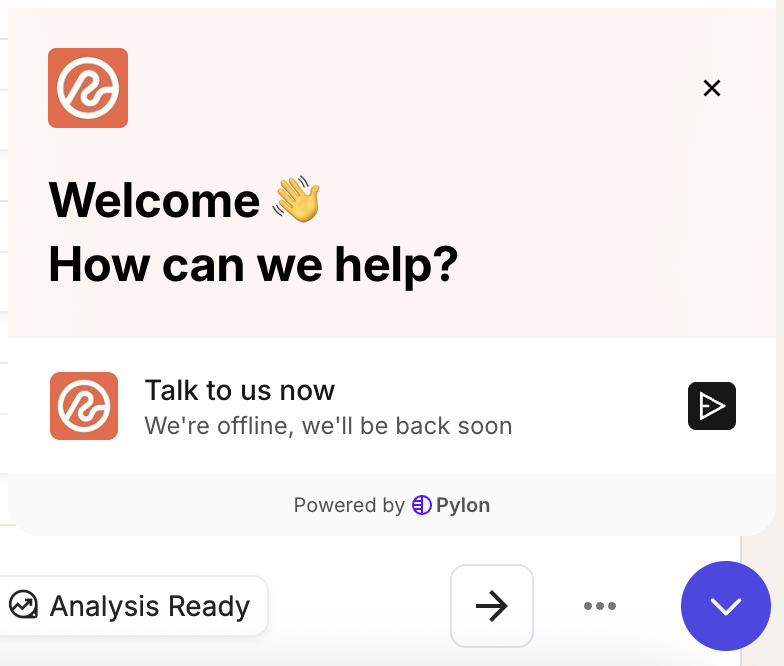
Click the round chat button in the bottom-right corner of any screen to open live chat. - Direct CS Contact — email Jolie Bartlett (jolie@pathworklife.com) for account strategy, training schedules, or feedback
- Recurring Drop-In Office Hours — standing weekly sessions (not optional add-ons) built into your onboarding plan for your team to bring live questions
Appendix
Carriers Supported in Pathwork
A full directory of the Life, LTC, Hybrid, and STC carriers integrated into Pathwork. Supported carriers power platform features including Ask Pathwork, Risk Predictions, Quick Quotes, and Informals, though feature availability varies by carrier.
Life Carriers
- Ameritas
- Allianz
- Assurity
- Banner
- Cincinnati Life
- Corebridge
- Fidelity & Guaranty
- John Hancock
- Lincoln Financial Group
- MassMutual
- Mutual of Omaha
- National Life Group (LSW)
- Nationwide
- New York Life
- North American
- One America
- Pacific Life
- Principal
- Protective
- Prudential
- SBLI
- Securian
- Symetra
- Transamerica
- Columbus Life
- Equitable
- Foresters
- Penn Mutual
- Sagicor
- Security Mutual
LTC, Hybrid & STC Carriers
- Aetna - RecoveryCare
- Bankers Fidelity
- Brighthouse
- Cigna
- Global Atlantic Forecare
- GTL RecoverCash
- John Hancock LifeCare
- Lincoln Financial Group
- Manhattan Life
- Mutual of Omaha
- National Guardian Life
- Nationwide
- OneAmerica - AnnuityCare
- OneAmerica - AssetCare
- Securian
- Thrivent - CareForward
- Thrivent - LTCi
- Wellabe STC
Alignment Exercise
Mutual Action Plan (MAP)
This alignment exercise is completed together with your Executive Sponsor prior to your kickoff session to establish firm goals, turnaround times, and review milestones — and it carries through to your eventual Business Value Analysis.
Firm goals
e.g., reduce time-to-quote across all regional teams, cut manual APS review time firmwide
Target turnaround times
e.g., quick quotes returned within 24 hours, informals packaged within 48 hours
Success metrics
e.g., total hours reclaimed per month, cases supported across teams
Key power users / team members needing extra support
e.g., names or roles of underwriters prioritized for co-pilot sessions
Check-in cadence
e.g., weekly office hours, monthly leadership sync, quarterly business review
Completed together, not solo. Your CS Lead and Executive Sponsor complete this together ahead of the kickoff session — no need to prepare answers on your own.